The member portal
Anyone who signs in without staff access — and most people with a login —
lands in the member portal at /dashboard. It’s where members manage their
own profile, giving, membership, classes, events, volunteering, household, and
credentials, without needing help from staff.
This section is for you, the staff member, so you know what members experience and can support them. These pages describe the member’s side; the matching staff features are under Features.
How members get in
Section titled “How members get in”- Members sign in at your organization’s address +
/admin(the same sign-in page everyone uses) and are sent to/dashboardautomatically. - The portal needs a claimed account (email + password). People added as managed family members have no login — see Members & people.
What’s in the portal
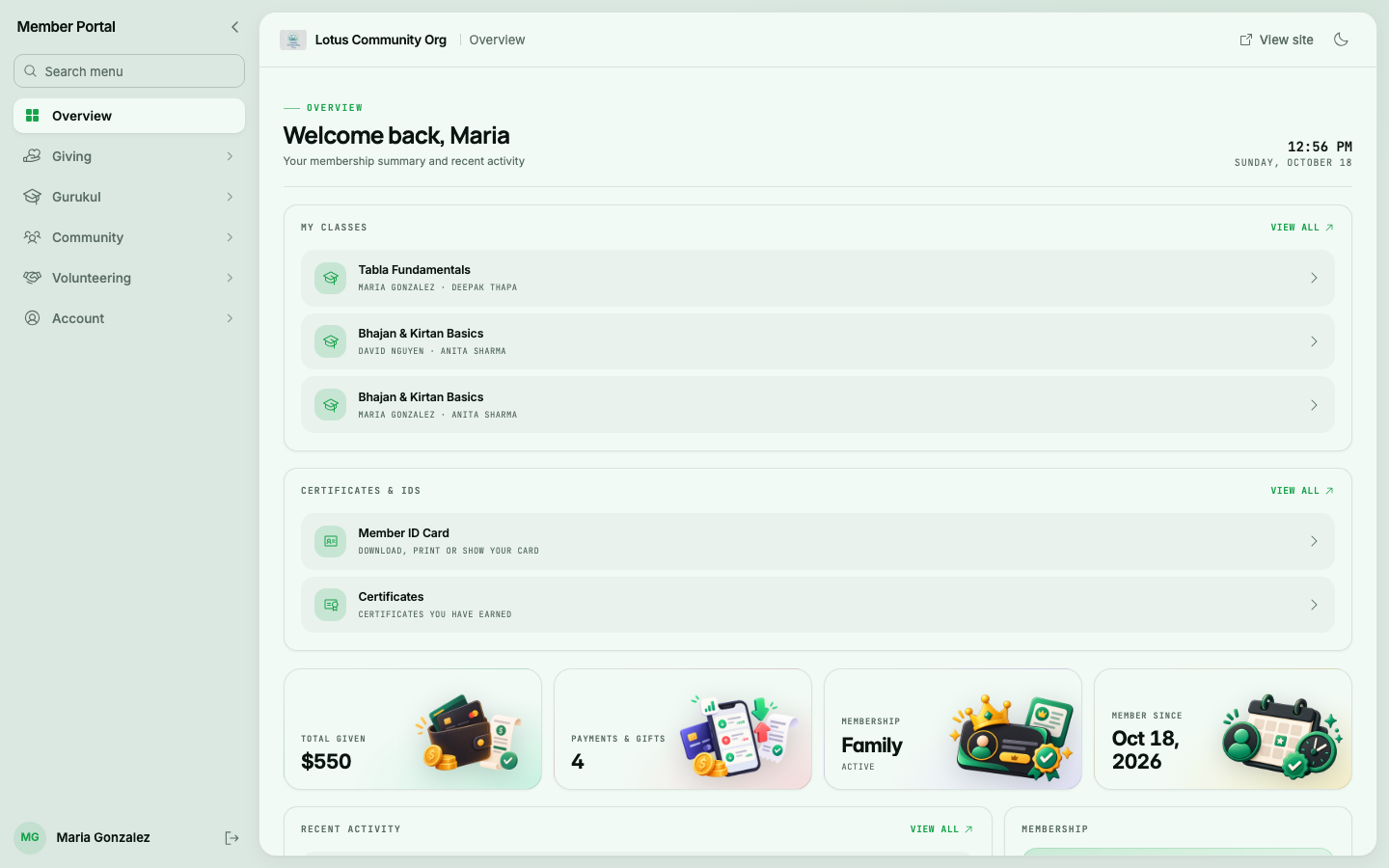
Section titled “What’s in the portal”The left menu groups everything a member can do:
- Overview — a snapshot: their giving total, membership, recent activity, their classes, and credentials.
- Giving — make donations and see their giving history.
- Learning — their family’s classes (and, for members who teach, instructor tools).
- Community — the events they’ve registered for.
- Volunteering — log and view volunteer hours.
- Account — profile, membership & billing, household, forms, and certificates & ID cards.
- Admin Panel — a link to the staff area, shown only to people who have some staff permission.
What each member sees can differ
Section titled “What each member sees can differ”Two things decide what appears in a member’s portal:
- Your plan. A whole area is hidden if your organization’s plan doesn’t include that feature (for example, Learning only shows with the Classes module). Core areas — Overview, Profile, and Membership — always appear.
- Who they are. The household primary contact gets extra controls; a member who teaches a class gets instructor tools; a member covered by a household membership sees a simpler billing view.
The payment gate
Section titled “The payment gate”If a member’s own membership payment is outstanding (a sign-up whose payment never completed), the whole dashboard is replaced by a Complete payment screen until they pay or log out. This protects paid areas while making it clear what’s needed. A payment that’s merely in progress shows a short “we’re confirming your payment” notice instead.
Account types, briefly
Section titled “Account types, briefly”- Member with their own login — full access to everything their plan includes.
- Primary contact — all of the above, plus managing their household.
- Member covered by a household membership — sees “Covered by household” and doesn’t manage billing (the primary contact does).
- Instructor — a member who also teaches, with instructor tools for their own classes.
Browse the pages in this section for the details of each area.