Audit log
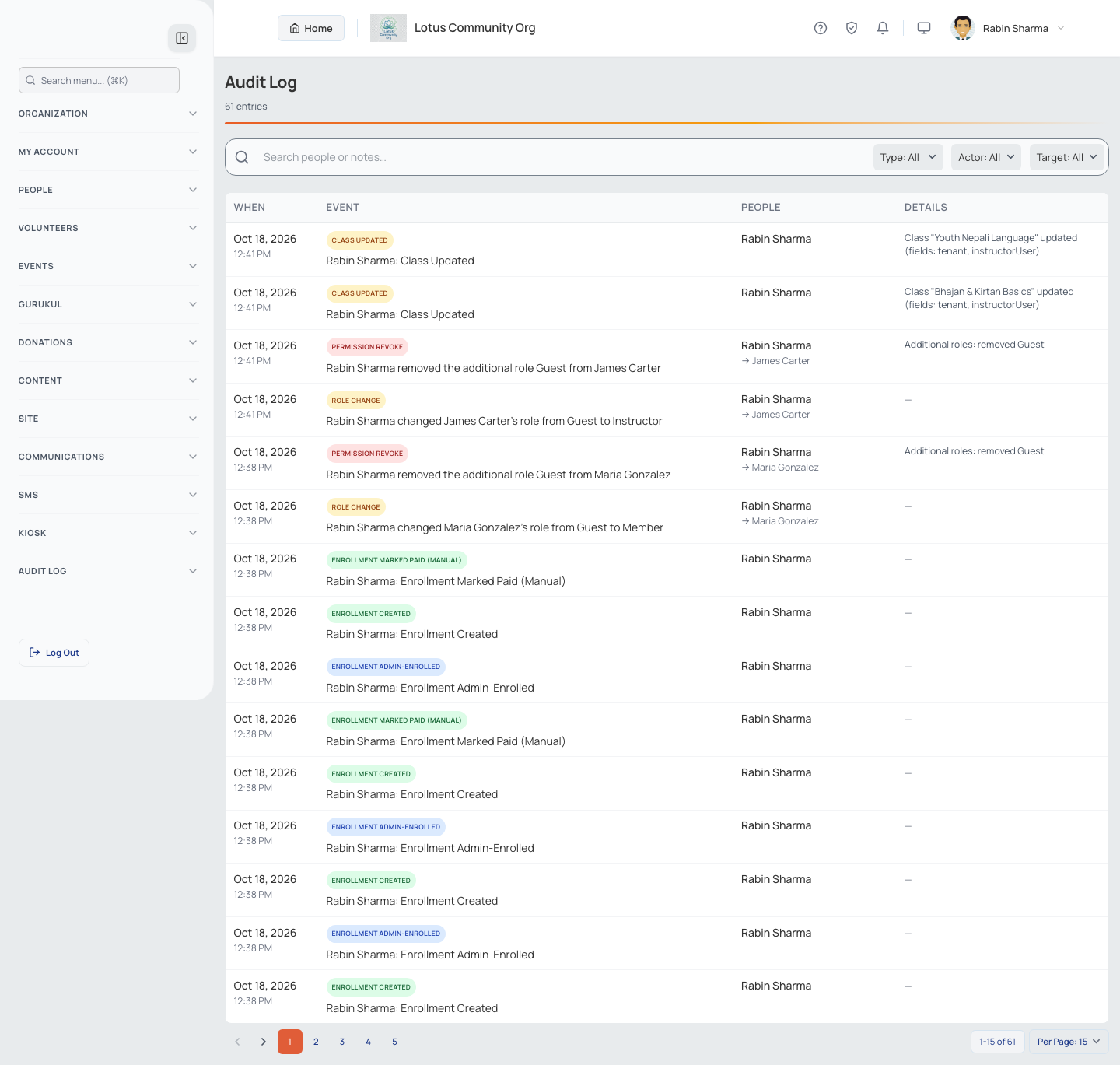
The audit log is a running record of important actions in your organization — who did them and when. It’s where you look when you need to understand a change.
Who can access: staff with View audit log. Part of the Audit & Communication Log module.
Where: left menu → Audit Log → Audit Log.
What’s recorded
Section titled “What’s recorded”The log captures sensitive and administrative actions, such as:
- Role and permission changes, and changes to who holds a role.
- Member changes, account claims and invites, blocks, and bulk imports.
- Donation and payment actions, refunds, and payouts.
- Class, certificate, and ID-card actions.
- Email template and SMS changes.
- Organization lifecycle and support-access events.
Each entry reads as a plain sentence (“so-and-so changed such-and-such”) with the date and the before/after values where relevant. You can filter by the type of change.
Not every entry is performed by a person — an automatic event, like a recurring class payment succeeding or failing on its own, is recorded with System as the actor rather than a staff member’s name.
The communication log
Section titled “The communication log”Separately, Audit Log → Communication Log records every email and text message your organization sent — the recipient, subject, type, and whether it was delivered. This is where you confirm a receipt or newsletter actually went out.